

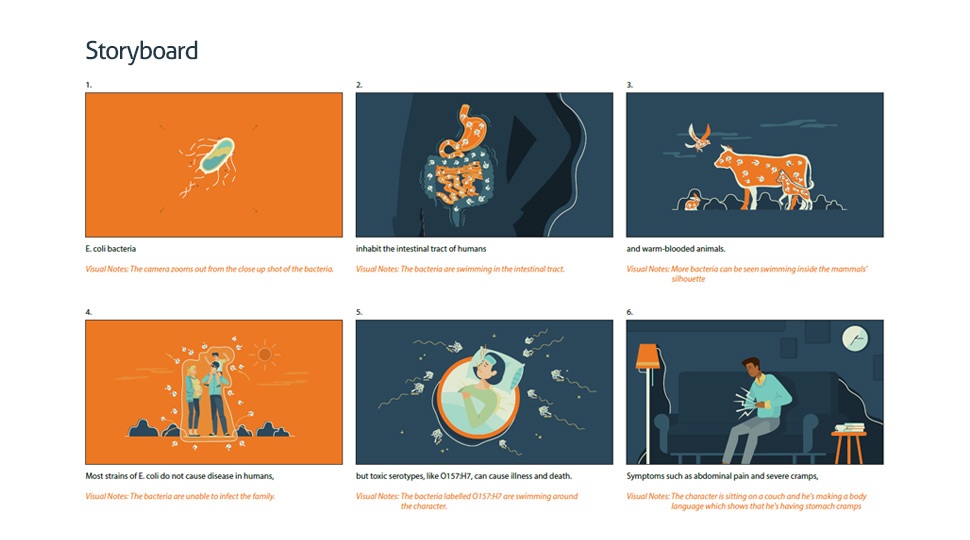
Before a single frame gets filmed or drawn, there’s a document that holds the whole production together. That’s the video production storyboard — a series of sketched panels that maps out every shot, camera move, and key moment in sequence. Clients sometimes call it a “floorplan for the video,” which is fair. You can move walls on paper; you can’t move them once the building is up.
- What Is a Storyboard and What Does It Contain?
- How to Read a Video Production Storyboard
- Types of Storyboards Used in Production
- Why a Storyboard Is Essential for Video and Animation Projects
- How to Create a Video Production Storyboard Step by Step
- Sound and Transitions: Two Things Most Clients Forget to Review
- Getting the Most From Your Storyboard Review
- Storyboarding Is an Investment, Not a Formality
Walt Disney Studios formalized the process in the early 1930s. The first fully storyboarded production was the 1933 short Three Little Pigs, and the logic behind it hasn’t changed much since: work out your story visually before you spend money making it.
What Is a Storyboard and What Does It Contain?
At its core, a storyboard is a series of drawn panels arranged in sequence — one panel per key moment, like frames from a comic strip. Each panel captures what the camera sees in that shot, and the notes around it fill in everything the sketch can’t show: what the character does, where the camera moves, what the narrator says.

A complete storyboard typically includes:
- Scene or shot numbers — so the team can reference, reorder, or discuss specific moments
- Sketch or illustration — the visual representation of what appears on screen
- Action notes — descriptions of character movements, prop changes, or scene transitions
- Camera notes — intended angles, zoom direction, panning, or tilt movement
- Voice-over or dialogue lines — synced to the corresponding visual
- Sound and music cues — especially important in animation storyboard production
How much detail goes into each panel depends on who’s looking at it. Internal sketches used to plan a shoot can be rough — loose shapes, placeholder figures, quick arrows. A storyboard going to a client, especially on an animation project, is a different thing entirely. Color, proportion, character expression — all of it matters because the client needs to visualize what they’re approving.
How to Read a Video Production Storyboard
Most people receive their first storyboard and immediately feel unsure what they’re supposed to do with it. The sketches look static and incomplete. That’s normal. Reading a storyboard is less about evaluating the art and more about decoding the intent behind each panel.
The Static Images Are Not the Final Product
A 60-second video might have 15 to 20 panels in its storyboard, and every one of them is frozen in time. That’s by design — the sketch shows one representative moment from the scene. What actually ends up on screen will move, cut, breathe, and sound like something. The panel is just a marker pointing toward that result.

People who haven’t worked with storyboards before sometimes worry the finished video will feel like a slideshow. It won’t.
Reading Camera Movement Arrows
When you see arrows overlaid on a panel, they indicate camera movement:
- Arrows spreading outward → zoom out
- Arrows converging inward → zoom in
- Horizontal arrows across the frame → pan left or right
- Vertical arrows → tilt up or down


These directional cues are easy to miss if you’re scanning quickly, but they carry significant meaning — especially for animation storyboard work where the “camera” is virtual and every movement must be deliberate.
Matching Visuals to Voice-Over
If the video has narration, the voice-over script should sit below each panel. Read it alongside the sketch to judge whether the visuals actually support the words. This is your best opportunity to catch mismatches — for instance, if the audio describes a product feature but the visual shows something unrelated.
Pro tip: If anything in the storyboard feels unclear or misaligned, raise it before production starts. Changes to a sketch take minutes; changes to filmed or animated footage can cost thousands.
Types of Storyboards Used in Production
Not all storyboards look alike. The right format depends on your budget, timeline, and whether you’re working on live-action or animation.
| Type | Format | Best For | Detail Level |
| Traditional / Sketch | Hand-drawn pencil panels | Film, TV, early-stage ideation | Low to medium |
| Thumbnail | Minimal rough sketches, no text | Quick concept validation | Very low |
| Digital / Vector | Built with actual production graphics | Animation storyboard projects | High |
| Colored / Detailed | Fully rendered, client-ready artwork | Premium projects, client approvals | Very high |
Traditional storyboards have stayed relevant in film and TV largely because a pencil sketch is cheap to change. Cross out a panel, redraw it, move on. Digital storyboards trade spontaneity for precision — on animation projects in particular, a digital board built with actual production assets gives clients a near-finished preview, which cuts back on the revision cycles that slow down production later.

Why a Storyboard Is Essential for Video and Animation Projects
Productions that skip storyboarding usually regret it. Not because the work can’t be done without one, but because problems that take five minutes to fix on paper can take days and significant money to fix in post.
It Catches Problems While They’re Still Cheap
Lay 20 panels out in order and the story either works or it doesn’t. A scene that jumps without explanation, a visual that contradicts the narration, a product benefit that gets buried in the middle — all of that shows up clearly when you can see the whole sequence at once. A disjointed transition or an unclear product message is easy to fix at the sketch stage — it is not easy to fix in post-production. According to CGSpectrum, a good storyboard also acts as a checklist, helping directors identify what actors, props, and camera angles are needed for each scene before anyone arrives on set.
It Gets Everyone Looking at the Same Thing
Read a script, and ten people picture ten different things. Show those same ten people a storyboard, and the conversation suddenly has a shared reference point. The director, the animator, the client, the editor — they’re all working from the same visual. On animation storyboard projects this matters even more, since dozens of artists may touch the same characters and environments over months of production.
It Makes Budget Planning Realistic
The global animation production market is projected to grow from $373 billion in 2024 to over $631 billion by 2034, and that kind of scale makes pre-production planning non-negotiable. Catching a creative problem at the storyboard stage costs almost nothing. Catching it after a scene has been animated can mean rebuilding it from scratch. For live-action, a locked storyboard translates directly into tighter shoot schedules — fewer surprises on the day, fewer days needed overall.

How to Create a Video Production Storyboard Step by Step
Step 1 — Know What You’re Making and Who It’s For
The storyboard can’t do its job if the goals behind the video are fuzzy. Before any sketching happens, get specific: what’s the core message, who’s the audience, and what do you want them to do after watching? These aren’t philosophical questions — they determine the visual tone, the pacing, the style, and where the call to action lands.

Step 2 — Build Your Characters and Visual World
For animation storyboard work especially, character development comes early. Sketch out your characters, define their personalities, and lock in their visual traits before mapping them across scenes. Inconsistent character design discovered mid-production is a painful fix.
Think through the following before committing to paper:
- Core message and narrative arc
- Target audience and their expectations
- Visual style and colour palette
- Whether animation, live-action, or a hybrid approach best serves the story

Step 3 — Break the Script Into Scenes
Take your script — or story outline, if no formal script exists — and divide it into its key moments. Each moment becomes a panel. Don’t worry about artistic precision at this stage; rough shapes and stick figures are perfectly acceptable. The goal is to get the sequence of ideas out of your head and onto paper.

Step 4 — Sketch the Panels and Add Visual Notes
Draw each scene in sequence. Below or beside each panel, add:
- What the camera is doing (angle, movement, zoom)
- What characters or objects are doing
- Any important voice-over or dialogue that runs in parallel
- Sound effects or music cues

Write these notes as if handing the board to someone who wasn’t in the room when the idea was born. The sketch captures the image; the notes carry the intent.
Step 5 — Review the Full Sequence, Then Share It
Go through the completed storyboard start to finish as if watching the video for the first time. Does the story flow? Are there unexplained jumps? Does the pace match the intended tone? Make adjustments until the whole thing holds together, then share it with your team and any clients for feedback.
This is where the work gets refined — not after cameras roll. Martin Scorsese described a storyboard as a blueprint: you fix the building on paper, not once the concrete is poured.
Sound and Transitions: Two Things Most Clients Forget to Review
When reviewing a storyboard, most people focus on the visuals and miss the two elements that often shape the final feel of a video most.

Sound needs to be mapped at the storyboard stage. Where does the background music fade in? Where does a sound effect hit to punctuate a product reveal? These aren’t post-production afterthoughts — they’re storytelling decisions that affect what gets drawn or filmed. If the animation storyboard doesn’t have sound notes, ask for them. Audio that’s planned late tends to get bolted on rather than built in.
Transitions are how scenes connect. A plain cut works fine most of the time, but a well-designed transition — where something from the outgoing scene (a shape, a color, a movement) flows naturally into the next — can make a video feel far more polished than it would otherwise. If your production team has planned these, the storyboard should show it. If it doesn’t, ask them to walk you through how each scene hands off to the next.
Getting the Most From Your Storyboard Review
When a production team shares a video production storyboard with you, approach the review with these priorities:
- Read the voice-over against the visuals — do they tell the same story?
- Check that camera movements are intentional, not arbitrary
- Confirm character actions match the narrative goals of each scene
- Flag any scenes that feel tonally inconsistent with the rest
- Ask about transitions between scenes if they’re not shown
For premium projects, it’s worth requesting a detailed, coloured storyboard rather than rough sketches — particularly for animation projects where visual style is central to the deliverable. If you’re paying for a high-quality production, you should be able to see a close approximation of what you’re getting before approval.

Learn more about Kasra Design’s approach to explainer video production and how storyboarding fits into the broader creative process on our video production page.
Storyboarding Is an Investment, Not a Formality
A well-built video production storyboard doesn’t just keep a project on track — it creates the conditions for better creative decisions at every stage that follows. Animators work faster when they have clear reference. Editors cut more confidently when the intended structure is already mapped. Clients give sharper feedback when there’s something concrete in front of them. The global 3D animation market is on track to surpass $51 billion by 2030, growing at a CAGR of 12.3% — and as production quality expectations rise with it, the margin for costly mid-production corrections keeps shrinking.
Starting a video or animation project and not sure what your storyboard should cover? Reach out to the Kasra Design team. We’ll take you through it.